
FolderSync Pro
Tacit DynamicsCommunication
4.62.64K Reviews
- Version
- 4.8.5
- Installs
- 100.00K
- Age Rating
- Everyone
Screenshots
Our Review of FolderSync Pro
 Analysis by Appyee
Ever gotten tired of juggling multiple cloud storage services? Yeah, me too. That's when I stumbled upon FolderSync Pro, and let me tell you, it was a game-changer. This app is designed to help you manage your files across different cloud platforms seamlessly, and it does it with a level of finesse that's hard to beat.
Getting Started with FolderSync Pro
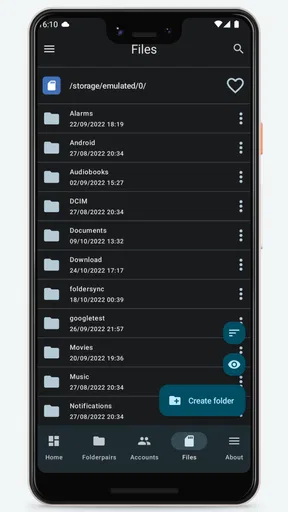
First things first, installing FolderSync Pro is a breeze. Just head over to the Google Play Store or App Store, depending on your device, and download it. Once installed, you're greeted with a clean and intuitive interface that makes navigation a piece of cake. No clutter, no fuss.
Setting Up Cloud Accounts
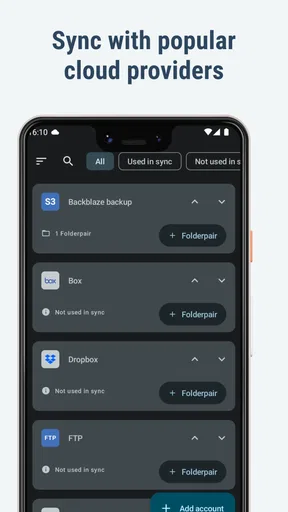
Setting up your cloud accounts is straightforward. Whether you're using Google Drive, Dropbox, OneDrive, or any of the other supported services, the app provides easy-to-follow prompts. Just log in, grant permissions, and you're good to go. The app supports a wide range of cloud services, so you're likely to find your go-to option here.
Syncing Your Files
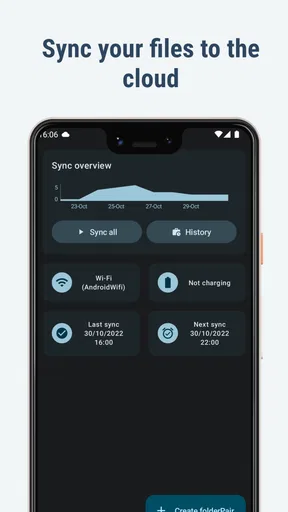
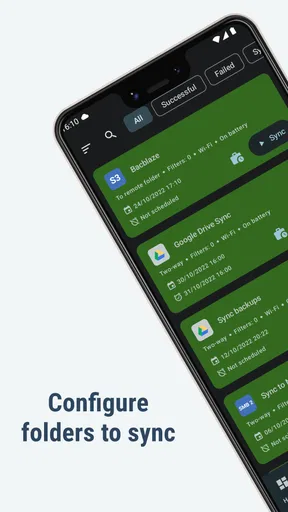
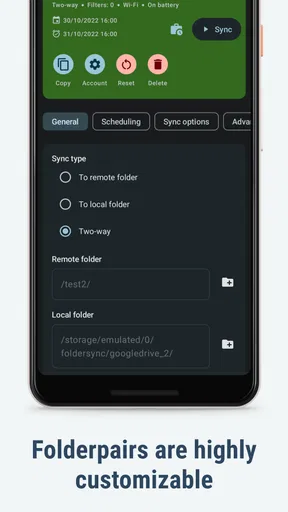
Now, onto the main event: syncing. Creating a sync pair is the heart of this app, and it's surprisingly simple. You select a local folder, choose a cloud folder, and decide the sync direction. Whether you want one-way or two-way sync, it's all up to you. This flexibility is perfect for users who need specific control over their data flow.
One thing I appreciate is the ability to schedule syncs. You can set it to sync daily, weekly, or even at a specific time of day. This kind of automation is a lifesaver, especially when you have a ton of data to keep track of.
Customization Galore
FolderSync Pro offers a wealth of customization options. You can decide how conflicts are handled, choose to sync only on Wi-Fi, or even set file size limits. The app truly lets you tailor the syncing process to fit your needs.
Another cool feature is the ability to exclude certain files or folders from syncing. This is handy if you have sensitive documents you don't want to upload to the cloud. It's all about giving you the power to manage your data effectively.
User Experience
On the user experience front, FolderSync Pro is a winner. The interface is clean and responsive, making it easy to navigate even for beginners. The app is regularly updated, ensuring you get the latest features and security patches. Plus, the support team is responsive, which is always a bonus in my book.
Performance-wise, it runs smoothly without hogging system resources. Even with multiple accounts and large files, the app maintains a steady performance, which is crucial for an app of this nature.
Final Thoughts
In a nutshell, FolderSync Pro is a solid choice for anyone looking to streamline their cloud storage management. Its robust features, ease of use, and flexibility make it a top contender in the syncing app space. Whether you're a casual user or a data hoarder, this app has something for everyone.
If you're ready to take control of your cloud storage and enjoy seamless file syncing, give FolderSync Pro a try. It's a small investment for a big improvement in your digital organization. Trust me, once you start using it, you'll wonder how you ever managed without it.
Verdict
Strengths of FolderSync Pro
- Seamless integration with cloud services.
- User-friendly interface with intuitive navigation.
- Automated sync options for convenience.
- Supports a wide range of file types.
- Highly customizable sync settings.
Limitations of FolderSync Pro
- Initial setup can be time-consuming.
- Advanced features may overwhelm novices.
- Limited free support options.
- Occasional connectivity issues reported.
- No built-in file editing capabilities.
Similar Picks in This Category
View All
Google Messages
Google LLC4.6

Gmail
Google LLC4.1

Google Meet
Google LLC4.4

Google Chrome
Google LLC4.1

WhatsApp Messenger
WhatsApp LLC4.6

Carrier Services
Google LLC4.2
Frequently Asked Questions
What is FolderSync Pro and how does it work?
FolderSync Pro is an app designed for Android devices that provides seamless synchronization of files between your device and various cloud storage services. It supports popular services like Google Drive, Dropbox, and OneDrive, allowing users to manage and back up their files efficiently. The app works by allowing you to set up sync tasks, ensuring your files are always up-to-date across devices.
Is FolderSync Pro secure to use for cloud storage synchronization?
Yes, FolderSync Pro prioritizes security by implementing encryption protocols for data transfer, ensuring your files remain confidential during the sync process. It allows users to manage security settings, such as enabling two-factor authentication with supported services. While the app itself is secure, users should also ensure their cloud service accounts have strong passwords and security measures in place.
Can I use FolderSync Pro with multiple cloud services simultaneously?
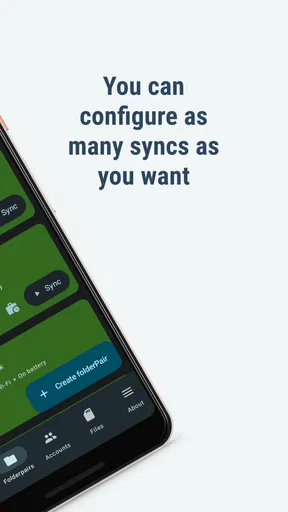
Absolutely! FolderSync Pro supports multiple cloud services, enabling users to sync files across different platforms at the same time. You can configure various sync tasks for each cloud service, allowing you to customize your file management strategy based on your storage needs and preferences. This flexibility is one of the app's key strengths.
What are the advantages of using FolderSync Pro over the free version?
FolderSync Pro offers several advantages over its free counterpart, including ad-free usage, additional cloud service support, and advanced features such as Tasker integration. The Pro version also provides enhanced customization options for sync tasks, allowing users to fine-tune their file management processes. These benefits make it ideal for users who require robust file synchronization capabilities.
Does FolderSync Pro require a subscription or is it a one-time purchase?
FolderSync Pro is a one-time purchase app available on the Google Play Store. Once purchased, users gain lifetime access to all features without any recurring subscription fees. This payment model makes it a cost-effective choice for users looking for a reliable and comprehensive file synchronization solution without worrying about ongoing costs.
